前言 最近,业务方提了一个需求,希望RN页面支持横竖屏。就去研究了一下, 顺便聊聊遇到的一些问题。
首先,应用要支持横竖屏旋转, 首先要在工程配置中勾选支持的方向。然后,不同的ViewController通过实现对应的接口实现横竖屏, 以及代码调用接口来手动实现横竖屏切换。
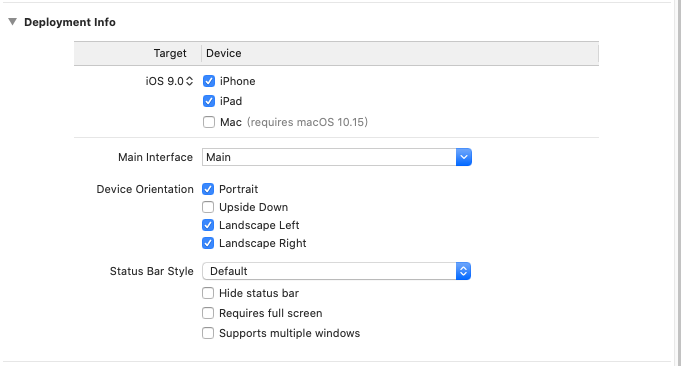
实现 勾选支持方向 工程 - General - Deployment Info - Device Orientation
controller接口 UIViewController需要实现3个接口
1
2
3
4
5
6
7
8
9
10
11
12
- (BOOL)shouldAutorotate { return _isAutoRotate; } - (UIInterfaceOrientationMask)supportedInterfaceOrientations { return self.supportedOrientation; } - (UIInterfaceOrientation)preferredInterfaceOrientationForPresentation { return self.preferredOrientation; }
只有当shouldAutorotate为YES时,其它两个接口才生效。
方向 我们看代码, 可以看到2个方向, 界面方向和设备方向
1
2
3
4
5
6
7
8
9
10
11
12
13
14
15
16
17
18
19
20
21
22
23
24
25
26
27
28
29
30
31
32
33
34
35
36
37
38
// 用户界面方向 typedef NS_ENUM(NSInteger, UIInterfaceOrientation) { UIInterfaceOrientationUnknown = UIDeviceOrientationUnknown, UIInterfaceOrientationPortrait = UIDeviceOrientationPortrait, UIInterfaceOrientationPortraitUpsideDown = UIDeviceOrientationPortraitUpsideDown, UIInterfaceOrientationLandscapeLeft = UIDeviceOrientationLandscapeRight, UIInterfaceOrientationLandscapeRight = UIDeviceOrientationLandscapeLeft } API_UNAVAILABLE(tvos); // 用户方向,一般与状态栏方向一致, 可以通过获取状态栏方向 来获取当前界面的方向 [[UIApplication sharedApplication] statusBarOrientation] // 设备方向, 当前设备的方向 typedef NS_ENUM(NSInteger, UIDeviceOrientation) { UIDeviceOrientationUnknown, UIDeviceOrientationPortrait, // Device oriented vertically, home button on the bottom UIDeviceOrientationPortraitUpsideDown, // Device oriented vertically, home button on the top UIDeviceOrientationLandscapeLeft, // Device oriented horizontally, home button on the right UIDeviceOrientationLandscapeRight, // Device oriented horizontally, home button on the left UIDeviceOrientationFaceUp, // Device oriented flat, face up UIDeviceOrientationFaceDown // Device oriented flat, face down } API_UNAVAILABLE(tvos); // 设备方向, 通过当前设备的接口获取, 需要事先调用 [[UIDevice currentDevice] beginGeneratingDeviceOrientationNotifications]; [[UIDevice currentDevice] orientation] ... // 操作 [[UIDevice currentDevice] endGeneratingDeviceOrientationNotifications];
很多时候, 界面方向会和设备方向不一致(支持当前设备方向的前提下)。 我们可以调用接口使其自动旋转。
1
2
3
[UIViewController attemptRotationToDeviceOrientation];
手动切换方向 目前只能通过修改orientation的方向来达到切方向的功能
1
2
3
4
[[UIDevice currentDevice] setValue:@(deviceOrientation) forKey:@"orientation"]; [UIViewController attemptRotationToDeviceOrientation];
根控制器支持横竖屏 大部分应用window不是以UIViewController为rootViewController。 一般是TabbarController或者NavigationControler。 要使得他们支持横竖屏,需要额外添加一个分类, 重新对应的接口
1
2
3
4
5
6
7
8
9
10
11
12
13
14
15
16
17
18
19
20
21
22
23
24
25
26
27
28
29
30
31
32
33
34
35
36
37
38
39
40
41
42
43
44
45
46
47
48
49
50
51
52
53
54
55
56
@implementation UINavigationController (Rotation) - (BOOL)shouldAutorotate { if (self.viewControllers && [self.viewControllers count] > 0) { return [self.topViewController shouldAutorotate]; } return [super shouldAutorotate]; } - (UIInterfaceOrientationMask)supportedInterfaceOrientations { if (self.viewControllers && [self.viewControllers count] > 0) { return [self.topViewController supportedInterfaceOrientations]; } return [super supportedInterfaceOrientations]; } - (UIInterfaceOrientation)preferredInterfaceOrientationForPresentation { if (self.viewControllers && [self.viewControllers count] > 0) { return [self.topViewController preferredInterfaceOrientationForPresentation]; } return [super preferredInterfaceOrientationForPresentation]; } @end @implementation UITabBarController (Rotation) - (BOOL)shouldAutorotate { return [self.selectedViewController shouldAutorotate]; } - (UIInterfaceOrientationMask)supportedInterfaceOrientations { return [self.selectedViewController supportedInterfaceOrientations]; } - (UIInterfaceOrientation)preferredInterfaceOrientationForPresentation { return [self.selectedViewController preferredInterfaceOrientationForPresentation]; } @end // 大部分ViewController只支持竖屏, 不支持切换 @implementation UIViewController (rotate) - (BOOL)shouldAutorotate { return NO; } @end
具体实现代码 请参考github库 https://github.com/fishmwei/iOSLearnList
番外:最近家里添丁,事情比较多,挺久没有更新博客了, 以后坚持一周至少一篇。
欢迎关注个人公众号 微信 -> 搜索 -> fishmwei,沟通交流。